

AI has become hard to ignore if you run a blog. It can help brainstorm topics, organize research, polish rough drafts, create visuals, and handle some of the repetitive work that comes with publishing regularly.
But that doesn’t mean you need an AI tool for everything.
After reviewing the original draft, I removed the unverified tools and claims and replaced them with established platforms whose current blogging-related features can be verified. The original draft recommended several tools and capabilities that weren’t sufficiently supported.
The goal of this guide isn’t to automate your entire blog. It’s to find tools that can make parts of your workflow easier without replacing your experience, judgment, or voice.
Affiliate Disclosure: This article contains affiliate links. If you join Wealthy Affiliate through one of my links, I may earn a commission at no additional cost to you. I recommend only products and services I have personally used or genuinely believe will add value for my readers. All opinions expressed in this review are my own.
What Should Bloggers Actually Use AI For?
Before paying for another subscription, figure out where AI could genuinely save you time.
For most bloggers, that usually means one or more of these areas:
- Brainstorming topics and angles
- Research assistance
- Creating outlines
- Drafting or rewriting sections
- Editing grammar and readability
- Creating graphics
- Keyword and competitor research
- Repurposing articles for social media
- Reviewing existing content
You probably don’t need five paid subscriptions. Start with the problem that’s slowing you down most.
1. ChatGPT — Best All-Around Blogging Assistant
Best for: Brainstorming, research assistance, outlines, drafting, editing, analysis, and repurposing
ChatGPT is one of the most versatile options because it isn’t limited to one part of blogging.
You can use it to turn a rough idea into an outline, brainstorm titles, simplify complicated paragraphs, analyze uploaded material, generate images, research subjects, or turn a finished article into social content.
The biggest advantage is flexibility.
Instead of using separate tools for every small writing task, you can build much of your workflow around a conversation.
Free vs. Paid
ChatGPT has a free tier with access to core capabilities, including web search and some file, data analysis, and image features, although limits apply. Paid plans provide broader access and higher limits for models and tools.
For a casual blogger, the free version may be enough to start. Someone regularly working with long documents, complex prompts, files, research, or images may benefit more from a paid plan.
Where It Falls Short
ChatGPT can still produce inaccurate information.
Don’t assume that a confident answer is automatically a factual one. Important facts, statistics, quotations, product features, legal information, and financial or health claims should be checked against reliable sources before publishing.
Best use: Treat it as a capable assistant—not an automatic author.
2. Claude — Best for Working Through Long Drafts
Best for: Writing, editing, document analysis, and developing ideas
Claude is another general-purpose AI assistant that can be particularly useful when you want to work through substantial amounts of text.
For bloggers, that makes it useful for reviewing drafts, reorganizing articles, comparing documents, brainstorming angles, and editing existing writing.
Claude currently offers writing and editing, text and image analysis, web search, and other capabilities on its free plan. Its paid Pro tier expands usage and provides additional features such as Projects and Research.
Who Is It For?
Claude makes the most sense if a large part of your workflow involves writing and working through documents.
You don’t necessarily need both Claude and ChatGPT. Try each and see which fits the way you work.
That’s a better reason to choose an AI tool than picking one simply because somebody calls it the “best.”
3. Grammarly — Best for Editing and Polishing
Best for: Grammar, rewriting, tone, and final editing
AI-generated first drafts get most of the attention, but editing is arguably one of AI’s more practical uses.
Grammarly can help identify grammar problems, awkward wording, tone issues, and sentences that could be rewritten more clearly. Its AI features go beyond traditional proofreading to include rewriting and writing assistance. Grammarly offers both free and paid options, with more advanced features and larger AI allowances available on paid plans.
That makes it useful even if you prefer writing the first draft yourself.
Don’t Accept Every Suggestion
Editing tools don’t understand your voice perfectly.
Sometimes an unusual sentence is intentional. Sometimes “correcting” conversational writing makes it sound stiff.
Use Grammarly’s recommendations as suggestions rather than instructions.
4. Canva — Best for Blog Graphics
Best for: Featured images, article graphics, social posts, and visual content
A blog isn’t only words.
Canva combines its established design tools with increasingly capable AI features. Its current platform includes AI-assisted creation and editing, while its Free and Pro tiers provide different levels of templates, media, storage, and AI usage.
For bloggers who aren’t graphic designers, that’s particularly useful for:
- Featured images
- Pinterest graphics
- Infographics
- Social posts
- Simple diagrams
- Branded article graphics
You can start with the free version and upgrade if premium assets, greater AI usage, brand features, or other Pro tools become important to your workflow.
One caution: don’t assume that anything created or found using an AI/design platform is automatically “copyright-free.” Understand the platform’s current content and licensing terms and consider third-party rights before using material commercially. Canva, for example, maintains specific licensing terms for its Free and Pro content.
5. Semrush — Best for SEO-Focused Bloggers
Best for: Keyword research, content planning, SEO analysis, and AI-search research
Semrush is different from the general AI assistants on this list because its value comes largely from combining AI with SEO and search data.
Its current Content Toolkit supports topic research, briefs, AI-assisted article generation, optimization, repurposing, and publishing workflows. Semrush also now includes tools aimed at traditional search and AI-search visibility.
This can make it useful if organic search is an important part of your blogging strategy.
The Catch
Semrush is a more specialized—and potentially more expensive—tool than a general AI assistant.
A new blogger doesn’t necessarily need it.
You can learn keyword research and basic SEO without paying for a large SEO platform. Consider upgrading when the data and workflow features justify the cost for your blog.
And remember: an SEO or AI-visibility score from any third-party platform is not a Google ranking score or guarantee.
Want to build your blog without getting buried in tools? Explore EasyMonitize for beginner-friendly guides on blogging, SEO, affiliate marketing, and growing an online business.
Do You Need All Five?
Definitely not.
A simple setup could be:
Writing and research: ChatGPT or Claude
Editing: Grammarly
Graphics: Canva
You could then add a dedicated SEO platform such as Semrush if search traffic becomes important enough to justify it.
Starting with fewer tools also gives you time to learn what AI is actually good at—and where your own judgment still matters more.

What AI Still Gets Wrong
AI is impressive, but bloggers need to understand its limitations.
Facts Can Be Wrong
AI can invent statistics, sources, quotations, product features, names, and other details.
Check important claims against reliable sources.
AI Doesn’t Automatically Give You Experience
An AI system can explain what it’s like to use a product, visit a destination, or build a business.
That doesn’t mean you experienced those things.
Don’t turn generated text into fake firsthand experience.
Privacy Still Matters
Think carefully before uploading private client information, confidential business documents, unpublished proprietary material, personal data, or anything else you wouldn’t normally hand to an outside service.
Review the tool’s current privacy and data controls before using sensitive material.
Copyright Isn’t Automatic
AI-generated content can raise questions involving copyright, licensing, trademarks, similarity to existing work, and platform terms.
Don’t assume “AI-generated” means “free of legal or originality concerns.”
AI Content, Google, and E-E-A-T
One question bloggers understandably ask is:
Will Google penalize my blog for using AI?
Using AI isn’t automatically the problem.
Google’s current guidance focuses on the quality and purpose of the resulting content rather than simply whether AI was involved. However, generating large numbers of low-value pages primarily to manipulate search rankings can violate Google’s scaled-content-abuse policies.
That’s an important distinction.
Use AI to help you create something useful—not to flood your website with articles.
E-E-A-T also matters here: Experience, Expertise, Authoritativeness, and Trustworthiness.
AI can help organize your knowledge.
It cannot manufacture genuine experience or expertise for you.
Add your own examples, opinions where appropriate, screenshots, testing, photographs, research, and lessons learned. Be transparent about affiliate relationships and make it clear who created the content.
What About AI Search?
Traditional Google results aren’t the only place people discover content anymore.
AI Overviews, AI Mode, ChatGPT, Gemini, Perplexity, and other AI-powered experiences are changing how information gets discovered.
You may see new terms such as AEO and GEO promising entirely new optimization strategies.
Don’t let that distract you from the basics.
Google’s current guidance says established SEO practices remain relevant to its generative AI search experiences and emphasizes valuable, unique, non-commodity content rather than creating countless pages for query variations.
In other words, don’t write for robots trying to answer robots.
Create content worth finding.
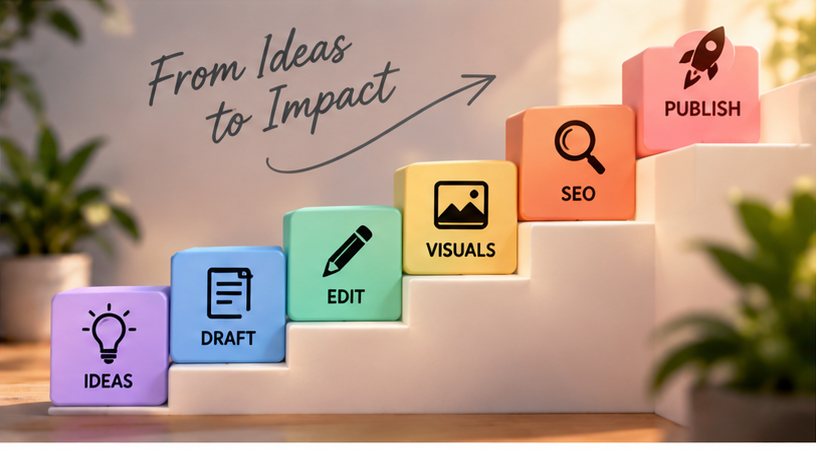
A Practical AI Workflow for Bloggers
You could use AI throughout an article without handing over the entire creative process.
Start with your own topic and audience. Use AI to brainstorm questions and organize your ideas. Research the subject using trustworthy sources. Build an outline. Write the article yourself or use AI to help develop sections. Add your own experience, examples, and perspective. Verify factual claims. Edit the finished draft. Create original supporting visuals. Then perform your normal SEO and publishing checks.
That workflow keeps you in control.
Free or Paid AI Tools: When Should You Upgrade?
Don’t upgrade simply because a tool tells you you’ve discovered a premium feature.
Pay when the limitation is actually getting in your way.
A free plan may be enough when you’re learning, publishing occasionally, or experimenting with AI.
Paid tools start making more sense when you’re consistently hitting usage limits, working with larger files, needing advanced research or collaboration features, creating more visual content, or earning enough from the blog that saving time has measurable value.
Features, usage limits, and prices change frequently, so check each provider before subscribing.
Final Thoughts
The best AI tool for bloggers isn’t necessarily the one with the longest feature list.
It’s the one that solves a real problem in your workflow.
ChatGPT and Claude can handle a broad range of writing and research tasks. Grammarly is useful for polishing. Canva makes visual creation more accessible. Semrush becomes more interesting when you need deeper search and content data.
Start small.
Learn what one or two tools can do well before building an expensive collection of subscriptions.
Most importantly, don’t automate away the thing that gives your blog a reason to exist in the first place:
You.
Your experience, ideas, examples, judgment, and perspective are what turn AI-assisted content into something readers might actually want to come back for.
Ready to build a smarter blogging workflow? Visit EasyMonitize for practical guides on AI tools, blogging, SEO, affiliate marketing, and building a sustainable online business.