

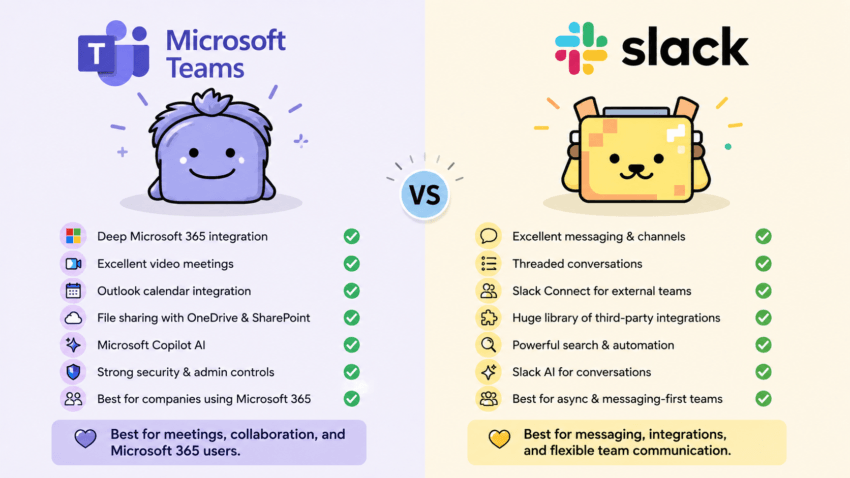
If you’re comparing Microsoft Teams vs Slack, you’ve probably noticed something pretty quickly: both platforms do many of the same things.
Both offer messaging, channels, video calls, file sharing, integrations, AI features, and tools for working with a team.
So, which one is actually better?
I’ve used both, and I personally prefer Microsoft Teams.
Affiliate Disclosure: This article contains affiliate links. If you join Wealthy Affiliate through one of my links, I may earn a commission at no additional cost to you. I only recommend products and services I have personally used or genuinely believe provide value to my readers. All opinions expressed in this review are my own.
For me, Teams feels cleaner and simpler. I find it easy to get into; there’s less visual clutter competing for my attention, and it fits naturally with tools like Outlook, Word, Excel, and OneDrive.
Another practical reason I lean toward Teams: in my experience, I encounter more businesses using Microsoft Teams than Slack.
That matters when you’re running a business. Sometimes the best tool isn’t the one with the most integrations or the longest feature list. It’s the one that makes it easier to get your work done.
That doesn’t mean Slack is a bad choice. Far from it.
Let’s compare Slack vs Teams and look at where each one makes sense.

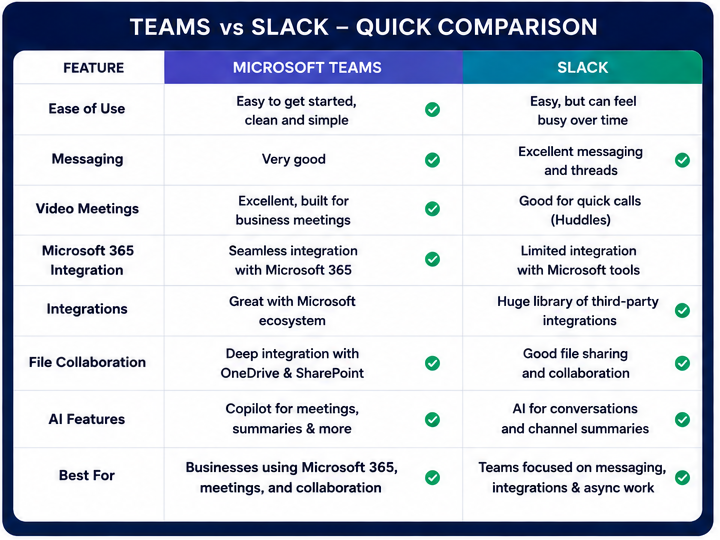
Microsoft Teams vs Slack: Quick Comparison
If you don’t want to read the entire comparison, here’s my quick take.
| Category | Microsoft Teams | Slack |
|---|---|---|
| Ease of Use | My Pick | Very Good |
| Messaging | Very Good | My Pick: Slack |
| Video Meetings | My Pick: Teams | Good |
| Microsoft 365 | My Pick: Teams | Limited |
| Third-Party Integrations | Good | My Pick: Slack |
| External Collaboration | Good | My Pick: Slack |
| File Collaboration | My Pick for Microsoft users | Very Good |
| AI | Great for meetings & Microsoft 365 | Great for conversations, search & workflows |
| Enterprise Use | My Pick: Teams | Very Good |
| Overall | My Pick: Teams | Great Alternative |
My recommendation is pretty simple:
Choose Microsoft Teams if you’re already using Microsoft 365, regularly attend video meetings, or want your business communication, calendar, files, and productivity tools working together.
Choose Slack if your business revolves around messaging, asynchronous communication, third-party apps, and lots of channel-based conversations.
For my own day-to-day use, I’d choose Teams.
What Is Microsoft Teams?
Microsoft Teams combines messaging, video meetings, file sharing, channels, calendars, and business collaboration in one platform.
Its biggest advantage is how naturally it fits into the Microsoft ecosystem.
If you’re already using Outlook, Word, Excel, PowerPoint, OneDrive, or SharePoint, Teams doesn’t feel like an entirely separate piece of software. It becomes another part of the same workflow.
That’s one of the things I like about it.
I can receive a meeting invitation in Outlook, click the Teams link, join the meeting, message someone afterward, and access shared files without bouncing between unrelated platforms.
What I Like About Teams
Some of the biggest advantages for me are:
- Simple, professional appearance
- Easy access to chats and meetings
- Excellent video conferencing
- Outlook calendar integration
- OneDrive and SharePoint integration
- Word, Excel, and PowerPoint collaboration
- Microsoft Copilot
- Strong business and enterprise features
But one of my favorite things about Teams is actually much simpler.
I like the way it looks and feels.
That’s obviously subjective, but when you’re using a communication platform every day, I think it matters.
I find Teams fairly clean and straightforward. I can open it, see what I need, and get to work.
What Is Slack?
Slack takes a slightly different approach.
It’s primarily built around messaging and channels.
You can create channels for departments, projects, clients, topics, or practically anything else. Slack also offers direct messages, threads, Huddles, Slack Connect, automation tools, AI features, and a large collection of third-party integrations.
And to give Slack credit, it does messaging extremely well.
If your company communicates mostly through channels rather than meetings or email, Slack can be a fantastic platform.
It’s especially useful for businesses that use lots of different online tools rather than relying primarily on Microsoft.
Why I Prefer Microsoft Teams Over Slack
This is where my comparison becomes more personal.
You can compare feature lists all day, but ultimately you have to use the software.
And that’s why I prefer Teams.
1. Teams Feels Less Cluttered to Me
Slack is highly customizable.
That’s one of its strengths, but it can also become a weakness.
Once you start adding channels, direct messages, apps, integrations, threads, automated notifications, and unread messages, a Slack workspace can get pretty busy.
Some people love that.
Personally, I don’t.
I prefer a more restrained workspace where I can jump in, communicate, and get back to what I’m doing.
Teams gives me that.
2. I Find Teams Easy to Get Into
You’ll often see Slack described as easier to use than Teams.
That hasn’t really been my experience.
I find Teams pretty straightforward.
If I need to message someone, I go to chat.
If I have a meeting, I join the meeting.
If someone sends me a file, I open the file.
I don’t feel like I have to spend much time thinking about the software itself.
And that’s exactly what I want from a business tool.
3. Teams Fits With Tools I Already Use
This is probably the biggest practical advantage.
If your business already uses Microsoft 365, choosing Teams makes a lot of sense.
Outlook, OneDrive, Word, Excel, PowerPoint, SharePoint, and Teams are designed to work together.
Instead of adding another separate communication platform to your business, you can keep more of your workflow within one ecosystem.
That can make things easier to manage.
4. I Encounter Teams More Often in Business
This is another reason I personally lean toward Teams.
In my experience, when I’m dealing with businesses and receiving online meeting invitations, Teams comes up more often than Slack.
That familiarity has value.
If the businesses, clients, vendors, or other professionals you work with already use Teams, there’s less friction.
You receive the invitation, click the link, and you’re in.
Sometimes convenience beats having another 1,000 integrations you’ll probably never use.
Microsoft Teams vs Slack for Messaging
If we’re judging strictly on messaging, I think Slack deserves the win.
Slack was built around messaging.
Its channels and threads make it easy to organize conversations by project and topic. It’s particularly useful for teams that work asynchronously and don’t want every conversation turning into another meeting.
Teams handles messaging perfectly well, though.
You can have direct conversations, group chats, teams, and channels.
I actually prefer the slightly more structured feel for business communication, but that’s personal preference.
Winner: Slack
Slack has the edge for pure messaging.
But if messaging is only one part of your workflow, Teams starts becoming more attractive.
Microsoft Teams vs Slack for Video Meetings
This one goes to Microsoft Teams.
Slack has Huddles, which are especially useful for quick, informal conversations.
Think of them as the online equivalent of leaning over to a coworker and saying, “Hey, do you have a minute?” But Huddles are more capable than simple voice chats: on supported paid plans, they can include video, screen sharing, multiple participants, threads, and other collaborative features.
Teams is better suited to traditional scheduled business meetings, especially for organizations already using Outlook and Microsoft 365.
You can schedule meetings, invite participants, share your screen, present information, chat during the meeting, record meetings, and use transcription and AI features.
And if you use Outlook, the calendar integration makes the whole process feel natural.
Winner: Microsoft Teams
If your business has many scheduled video meetings, I’d choose Teams.
Microsoft Teams vs Slack for AI
AI is becoming a bigger part of both platforms.
Microsoft has Copilot, while Slack has its own AI features.
The interesting part is that they solve slightly different problems.
Microsoft Copilot
Copilot makes the most sense if your work already happens inside Microsoft’s ecosystem.
It can help with things such as:
- Meeting summaries
- Action items
- Conversation summaries
- Finding information
- Catching up on meetings
- Working with Microsoft 365 content
I particularly like the idea of AI helping with meetings.
We’ve probably all left a meeting thinking, “Wait…what exactly did we decide?”
Having AI help summarize the discussion and pull out action items can actually be useful.
Slack AI
Slack’s AI features are closely connected to its biggest strength: the information flowing through conversations and channels.
Depending on your Slack plan and the features available to your organization, Slack AI can help you catch up on busy channels, summarize discussions, search for information, create recaps, summarize files, assist with Huddles, translate content, and support workflow-related tasks.
If your company communicates heavily through Slack channels, that can save a lot of time.
Winner: It Depends
I wouldn’t declare a universal winner here.
For meeting-heavy businesses and Microsoft 365 users, I’d choose Copilot.
For businesses that live inside channels and asynchronous conversations, Slack’s AI tools may be more useful.
Microsoft Teams vs Slack Integrations
Here’s where Slack fights back.
Slack is known for its huge selection of third-party integrations.
If you’re using project management tools, CRMs, developer platforms, cloud storage services, customer service software, and a variety of other online tools, there’s a good chance Slack can connect with them.
Microsoft Teams also supports third-party integrations, but its biggest advantage is clearly Microsoft’s own ecosystem.
So the question isn’t really:
Which one has more integrations?
A better question is:
Which one integrates with the tools I actually use?
If your business runs on Microsoft 365, Teams makes a lot of sense.
If you’ve built your business around a collection of different SaaS platforms, Slack may be the better fit.
Winner: Slack for variety
Winner: Teams for Microsoft 365 integration
Microsoft Teams vs Slack Pricing
Pricing is one area where I’d recommend looking beyond the advertised monthly price.
Ask yourself what you’re already paying for.
If you’re already paying for a Microsoft 365 plan that includes Teams, Teams may fit naturally into your existing business software costs.
One important detail is that you shouldn’t assume Teams automatically comes with every Microsoft 365 subscription. Microsoft offers business plans both with and without Teams in some markets and configurations, so check what your specific plan includes.
If you choose Slack, you may be adding another paid platform on top of the productivity software you’re already using.
That doesn’t automatically make Slack too expensive.
If Slack improves the way your team works, the cost may be completely justified.
But I wouldn’t compare the two based only on the price of an individual subscription.
Look at your total software stack.
Consider:
- Cloud storage
- Video meetings
- Office software
- Communication
- AI tools
- Integrations
- Security
- Administration
Sometimes consolidating tools can be just as valuable as finding the cheapest individual subscription.
Because plans and pricing change, I also recommend checking the current Microsoft and Slack pricing before making your final decision.
Microsoft Teams vs Slack for Small Businesses
For small businesses, I’d start with one simple question:
What are you already using?
If your business runs on Microsoft 365, I’d probably choose Teams.
You already have Outlook, Office apps, cloud storage, calendars, and other Microsoft tools. Adding Teams keeps things connected.
If you’re running a more independent collection of online tools, Slack might make more sense.
For example, if your business is heavily focused on asynchronous communication and uses several different cloud platforms, Slack’s flexibility can be valuable.
I don’t think there’s one correct answer for every small business.
The goal should be to choose the platform that makes your work simpler, not the one with the longest feature list.
Microsoft Teams vs Slack for Remote Work
Both are good options for remote teams.
Slack has an advantage for companies that communicate asynchronously.
You can leave messages in channels, reply in threads, and let people catch up when they’re available.
Teams can do that too, but I think its advantage appears when remote work involves regular meetings.
You have messaging, calendars, scheduled meetings, files, and documents all connected.
So I’d break this one down like this:
Lots of asynchronous communication: Slack
Lots of meetings and Microsoft 365 collaboration: Teams
Microsoft Teams vs Slack for Business
If I were setting up communication for a business today, I’d lean toward Microsoft Teams.
Not because Slack isn’t capable.
It absolutely is.
But I like keeping things simple.
If I’m already paying for Microsoft business tools, I don’t want to introduce another communication platform unless there’s a good reason.
Teams gives me chat, meetings, files, calendars, and collaboration in one familiar environment.
And because I already encounter Teams frequently when dealing with other businesses, it feels like the more practical option for me.

Microsoft Teams Pros and Cons
Pros
- Clean, professional appearance
- Easy to get into
- Excellent video meetings
- Strong Microsoft 365 integration
- Outlook calendar integration
- OneDrive and SharePoint file collaboration
- Microsoft Copilot
- Good enterprise administration
- Familiar in many business interactions
Cons
- Works best when you’re already using Microsoft
- Advanced settings can become complicated
- Some features depend on your Microsoft plan
- Doesn’t have Slack’s enormous third-party integration ecosystem
Slack Pros and Cons
Pros
- Excellent messaging
- Great channel organization
- Strong threaded conversations
- Huge integration ecosystem
- Slack Connect
- Good for asynchronous teams
- Useful automation options
- Strong AI features for conversations, search, summaries, and workflows
Cons
- Can become visually cluttered
- Lots of channels can become difficult to manage
- Notifications can get distracting
- Less focused on traditional scheduled meetings than Teams
- Costs can increase as your team grows
- Less compelling if you’re already deeply invested in Microsoft 365
So, Is Microsoft Teams or Slack Better?
There isn’t one answer that works for everybody.
That’s something I think matters when comparing business tools.
A feature that’s essential to one business may be completely irrelevant to another.
Choose Slack if:
- Your business revolves around messaging.
- You prefer asynchronous communication.
- You use lots of different third-party tools.
- Slack Connect is important to you.
- Your team already loves Slack.
Choose Microsoft Teams if:
- You already use Microsoft 365.
- You regularly use Outlook.
- Video meetings are important.
- You collaborate on Microsoft Office files.
- You prefer a simpler, more contained workspace.
- You frequently work with other businesses using Teams.
For me, Teams is the better choice.
My Final Verdict: I Prefer Microsoft Teams
When I compare Microsoft Teams vs. Slack, I don’t think the decision comes down to which platform checks the most boxes.
Both check plenty of boxes.
What matters more to me is how the software fits into my actual workday.
And that’s why I choose Microsoft Teams.
I prefer its simple aesthetic.
I find it easy to get into.
I don’t feel like there’s as much visual clutter competing for my attention.
It works naturally with Microsoft tools I already know.
In my experience, I run into businesses using Teams much more often than businesses using Slack.
Slack definitely wins in some areas. Its messaging is excellent, and its third-party integrations are hard to beat.
But I don’t need every possible integration.
I need a communication tool that gets out of my way and lets me work.
For me, that’s Microsoft Teams.
And your answer may be different.
That’s okay.
Before choosing either one, think about the tools you already use, how your team communicates, how often you hold meetings, and what will actually make running your business easier.
That’s ultimately more important than choosing whichever platform has the longest feature list.
Frequently Asked Questions
Is Microsoft Teams better than Slack?
I personally prefer Microsoft Teams because I find it simple, easy to use, and less visually cluttered. It also works extremely well with Microsoft 365. Slack may be better if messaging and third-party integrations are your biggest priorities.
Is Slack easier to use than Microsoft Teams?
Many people consider Slack easy to use, but I personally find Teams easier to get into. Slack’s channels, integrations, notifications, and customization can become busy as a workspace grows. This one really comes down to personal preference.
Why choose Teams instead of Slack?
Teams makes sense if you already use Microsoft 365, Outlook, OneDrive, Word, Excel, or other Microsoft products. It’s also a strong choice if your business relies heavily on scheduled video meetings.
Why choose Slack instead of Teams?
Slack makes sense if your company is messaging-first, works asynchronously, uses lots of third-party cloud applications, or needs Slack Connect for external collaboration.
Is Teams or Slack better for small businesses?
I’d choose Teams for a small business already using Microsoft 365. Slack can be a great choice for a small business that uses a diverse collection of online tools and relies heavily on asynchronous messaging.
Is Teams or Slack better for video meetings?
I choose Microsoft Teams for video meetings. It’s designed around scheduled business meetings and works naturally with Outlook calendars.
Is Slack better for messaging?
I think Slack has the advantage for pure messaging. Its channels and threads are excellent. Whether that makes Slack the better overall platform depends on how important messaging is compared with meetings, files, calendars, and other business tools.
Can Microsoft Teams replace Slack?
For many businesses, yes. Teams provides messaging, channels, video meetings, file sharing, integrations, and collaboration tools. Businesses heavily invested in Slack-specific workflows and integrations may have a stronger reason to stay with Slack.
Which would I choose in 2026?
Microsoft Teams.
Slack is a very capable platform, but Teams fits the way I prefer to work: simple, familiar, connected, and with less visual clutter.refer to
work: simple, familiar, connected, and with less visual clutter.